WhatsApp invitations & reminders
Personal messages in your own words, scheduled when you want. Edit the text any time; the next send uses it.
WhatsApp RSVPs · Seating charts · AI assistant
RSVPs on WhatsApp, without chasing anyone
Upload your guest list. Guestly sends each guest a personal WhatsApp invitation, reminds whoever hasn’t answered, and seats everyone automatically. You just watch the answers come in.
How it works
The part of the event nobody enjoys — handled
Import an Excel file or add guests one by one. Phone numbers are cleaned up automatically.
A personal message with the guest’s name and an RSVP button. You choose the wording and the time; reminders go only to people who haven’t answered.
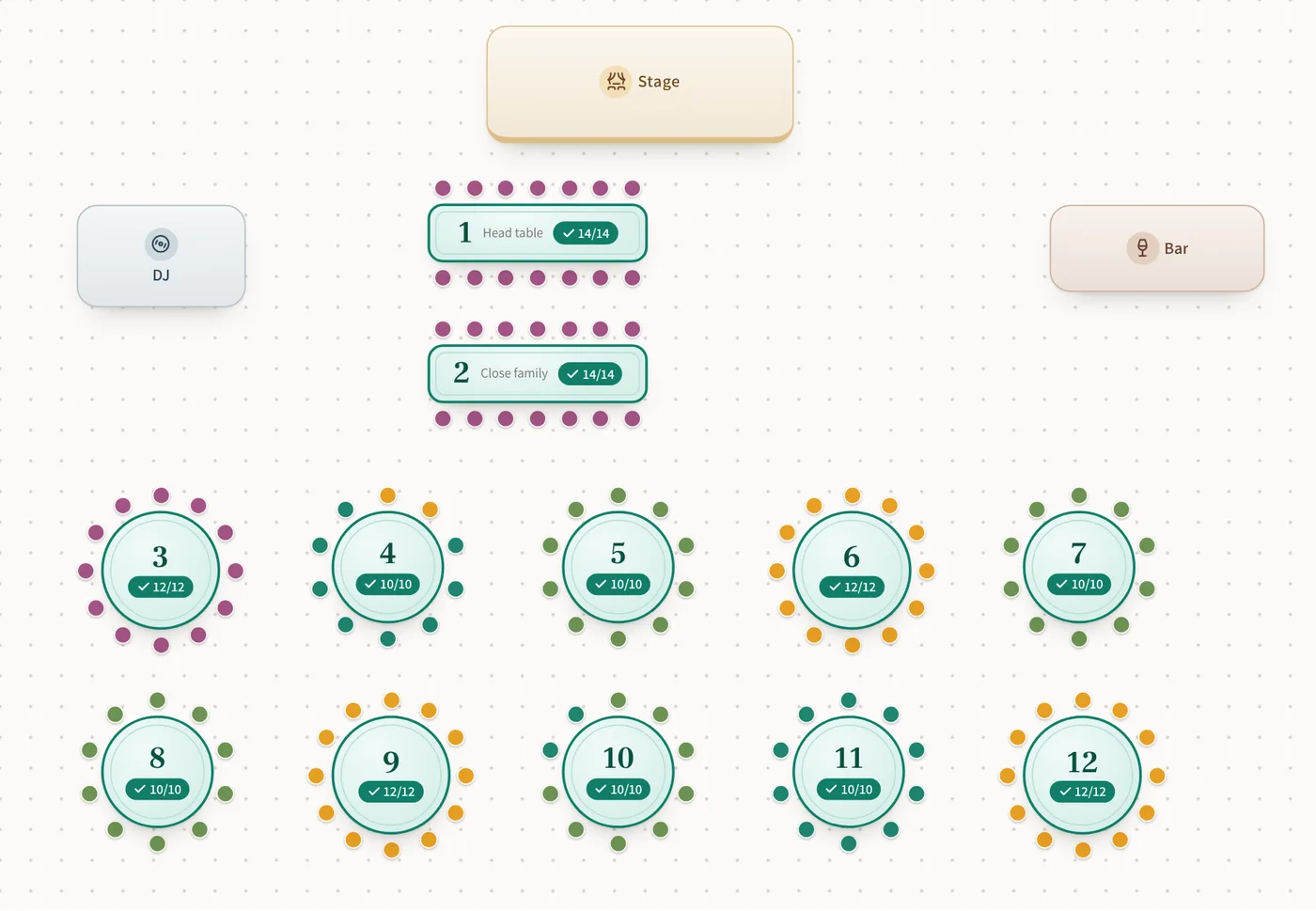
Arrange tables automatically by group, drag to fine-tune, and share the final list with your venue.
Features
Personal messages in your own words, scheduled when you want. Edit the text any time; the next send uses it.
Who’s coming, who isn’t, who hasn’t answered, and the total headcount. Always up to date.
Tables filled by group in one click, with drag-and-drop to adjust. Updates when answers change.
Guests answer in one tap from WhatsApp on a simple page. No download, no sign-up.
A morning-of message with a Waze link to the venue, and a thank-you message the day after.
Hebrew, English, Spanish, French, Portuguese, German and Italian, with full right-to-left support for Hebrew.
Automatic seating
Guestly fills the tables for you: families and friend groups together, table capacity respected, your table preferences kept. Then drag anyone to fine-tune.
AI assistant
Connect Guestly to your AI assistant (MCP) and just ask. It sees your guest list, answers and tables — and only yours.
“Who from the bride’s family hasn’t answered yet?”
Pricing
Building your list, seating and the RSVP page are free. You pay only for guests you send WhatsApp messages to.
$0.17 per guest · No subscription and no commitment. Buy credits only when you’re ready to send.
FAQ
They get a WhatsApp message with their name and an RSVP button. One tap opens a short page where they say if they’re coming and how many. No app and no sign-up.
Signing up, building your list and seating are free. WhatsApp messaging costs $0.17 per guest, once, and covers the invitation, reminders, the event-day message and the thank-you. No subscription.
No. Messages are sent from Guestly’s verified WhatsApp Business number, with your event’s name in the message, so your own phone stays free.
Yes. Edit the wording, add the guest’s name, date, venue or a navigation link, and send yourself a test first. Changes apply to the very next send.
Yes. Upload an Excel or CSV file with names, phone numbers and groups, or add guests one by one.
Guest details are used only to run your event. We don’t sell them or share them with anyone except to deliver your WhatsApp messages.
Create your event in a minute, add your guests, and send yourself a test message. It’s free to start.